Posts

My swollen MacBook Pro battery

Image
Yes! I came back from holiday to find my faithful old MacBook Pro with swollen battery. I called Apple Support to report this problem. I was told that this is known issue but my machine was not eligible for a replacement due to its age. I noticed that my laptop wasn't sitting flush against my desk anymore and the battery had started to expand. I took it out and several days later, it expanded significantly MORE. I then went ahead and removed the battery pack from the laptop, but to my amazement, the battery started expanding in at a quicker rate whilst I was waiting to order a replacement from an after-market dealer. Now, what’s a Swollen Battery? The vast majority of laptops are all powered by lithium-ion batteries. As far as compact batteries go, they’re pretty great. They have high energy density, low self-discharge, and a very tiny memory effect which are all features that make them perfect for inclusion in everything from MacBooks to...
Oxwall and OpenShift

Amazon Web Services Simple Storage Service (S3) is  the  service allowing you to store files  on   the  Amazon company's servers, and to just forget about traffic load issues.  The  data storage volumes are unlimited, which means that you won't be asked to leave  the  service even if you store thousands of terrabytes of data. What does it take for  Oxwall  to start working with Amazon S3? Create an account  on   http://aws.amazon.com/s3/ .  The  following video explains that in details:  http://www.youtube.com/watch?v=ZvigljxXqsk Create a bucket and set  the  reading permissions for all users Copy  the  ow_userfiles folder to  the  bucket you've created (  bucket_name/ow_userfiles  ) and set  the   reading permissions  for all users Now open  the   ow_includes/config.php  file and insert  the  following code at...

Install Oxwall on Mac OSX Lion

Image
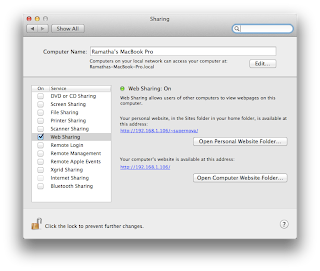
Install Oxwall on Mac OSX Lion In order to install Oxwall correctly you must have the applications below installed the running on the your machine. Mac OS X Lion comes with both Apache and PHP preinstalled, but they're not enabled by default. The following instructions below should help you get up and running. Apache WEB server, version 2.0 or higher. ( http://httpd.apache.org/download.cgi ) This is very easy task to perform but before you can enable PHP on a Mac, you first have to enable Apache. Fortunately this is extremely easy. If you would like more information about Apache on the Mac you can read more here . 1.) Click the 'System Preferences' icon in the Dock. 2.) Click the 'Sharing' icon in the Internet & Network section of the System Preferences window. 3.) Place a check mark in the ‘Web Sharing’ box. That's it! If you want to test if it worked, point your browser to http://localhost/ and you should see the standard ...